A guide to the new generation of open, programmable devices that look like consumer electronics but put you in control of the entire stack.
For years, the ESP32 was just another microcontroller on a bare circuit board — something you plugged into a breadboard and programmed with blinking LED tutorials. That era is over.
Today, companies like Espressif, LILYGO, M5Stack, Elecrow, and Seeed Studio produce devices built around ESP32 chips that look like smartwatches, smartphones, cyberdecks, and smart speakers. They have touchscreens, batteries, cameras, microphones, and wireless radios. They ship in enclosures. Some of them could pass for finished consumer products.
But they aren’t consumer products. They’re something new.
We’re calling them Open ESP32 Gadgets: small, self-contained devices built around Espressif chips that resemble familiar consumer electronics but remain fully programmable and developer-accessible. No locked-down OS. No cloud account required. No subscription. You control the firmware, the networking, the interface, and the hardware behavior.
This is the guide to what they are, what you can build with them, and why they matter right now.
What Makes Something an Open ESP32 Gadget?
- Familiar form factor. It looks like a device you’d recognize — a watch, a phone, a speaker, a handheld console.
- Finished or semi-finished hardware. It ships with an enclosure, display, battery, or other components beyond a bare PCB.
- Fully programmable. The firmware is open and modifiable using tools like Arduino, ESP-IDF, or PlatformIO.
- Wireless connectivity. Wi-Fi and Bluetooth are built in. Many newer devices add LoRa, Thread, or Zigbee.
- No cloud dependency. These devices can operate entirely locally — on your network, with your server, under your control.
In other words, they look like gadgets but behave like open development platforms.
The Gadget Taxonomy
The ESP32 ecosystem now spans at least 18 distinct device form factors that mirror familiar consumer electronics. Here’s what exists.
Smartwatch
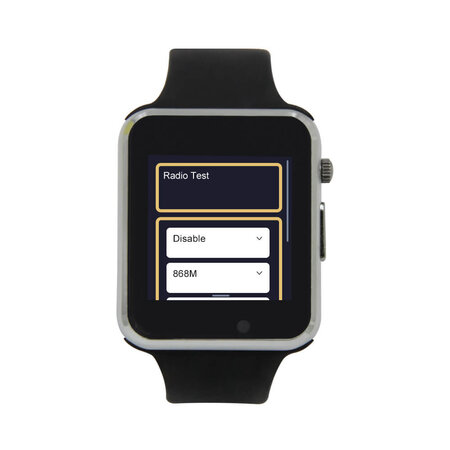
Wearable devices with small displays, sensors, and BLE connectivity.
Examples: LILYGO T-Watch S3, M5StickC Plus2 watch kit
What people build:
- Fitness trackers
- Sensor dashboards
- Notification monitors
- BLE remote controls
Smartphone
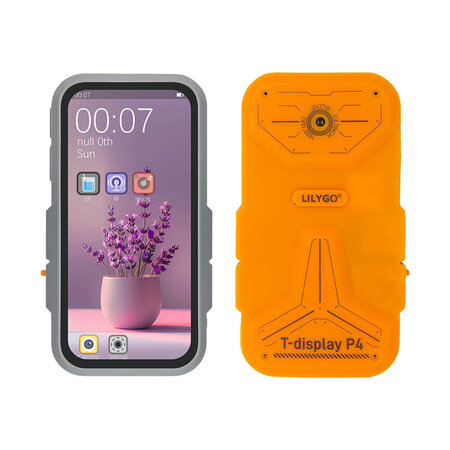
Phone-shaped handheld computers with touchscreens, cameras, and multiple radios.
The T-Display P4 is one of the most interesting new devices in the ecosystem. It combines an ESP32-P4 (dual-core RISC-V at ~360 MHz), an ESP32-C6 for wireless, an optional LoRa transceiver, a 4-inch touchscreen, a camera, microphone, speaker, headphone jack, and microSD slot — all in a device roughly the size of a smartphone.
Examples: LILYGO T-Display P4
What people build:
- Music players
- LoRa communicators
- Portable terminals
- Field data collectors
- Handheld radio tools
Tablet
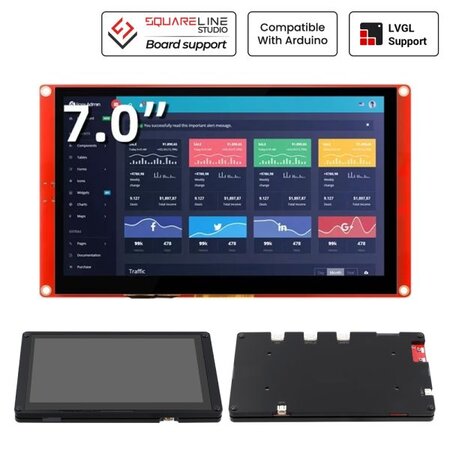
Portable touchscreen devices with larger displays, typically battery-powered.
Examples: Elecrow CrowPanel 7″, CrowPanel Advance 7″ ESP32-P4, CrowPanel Advance 10.1″ ESP32-P4
What people build:
- DIY GPS navigators (with an external GNSS module and self-hosted OpenStreetMap tiles)
- Home automation controllers
- Industrial dashboards
- Portable instrumentation displays
- Robotics control interfaces
Desk Smart Display
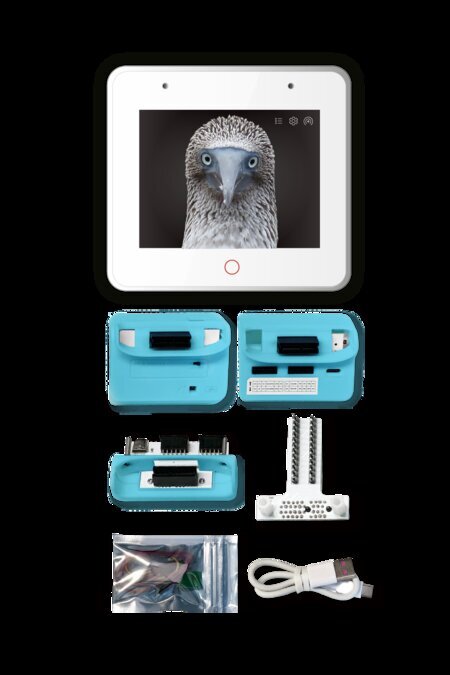
Touchscreen devices designed to sit on a desk or stand. Think of these as the modern equivalent of a digital photo frame, but programmable.
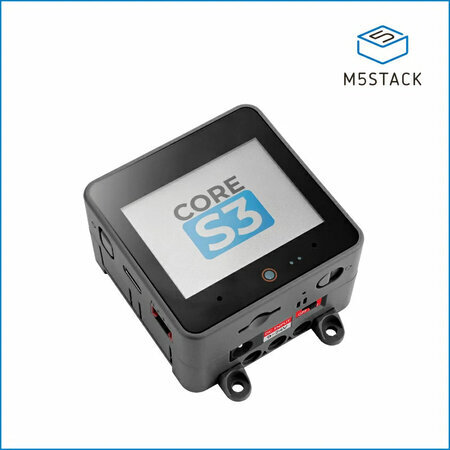
Examples: ESP32-S3-BOX-3, M5Stack CoreS3, Elecrow CrowPanel 5″
What people build:
- Smart home dashboards
- Weather stations
- IoT device monitors
- Voice assistant consoles
- Calendar/clock displays
Smart Speaker
The open-source answer to the Amazon Echo, Google Home (now Google Nest), and Apple HomePod. These are stationary, always-on, plugged-in devices that sit on a counter or shelf — microphone arrays, decent speakers, and a constant network connection. The commercial versions are tied to Alexa, Google Assistant, or Siri — and by extension, to those companies’ cloud services, data collection, and ecosystem lock-in.
An ESP32 smart speaker runs locally. Voice processing can happen on-device or on your own server using the Wyoming Protocol — Whisper for speech-to-text, Piper for text-to-speech, all on your network. No wake word gets sent to a corporate cloud. No conversation history gets stored on someone else’s infrastructure.
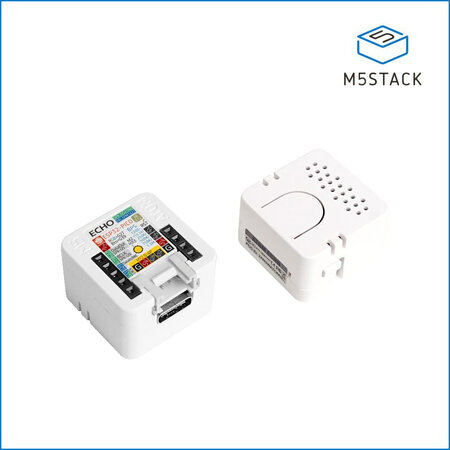
The category also includes smaller “voice satellite” devices — tiny modules like the Atom Echo that act as remote microphone/speaker endpoints for a central Home Assistant server. Scatter a few around the house and you have whole-home voice control without buying a single Amazon or Google device.
Examples: ESP32-S3-BOX-3, Atom Echo
What people build:
- Offline voice assistants
- Home automation voice controllers
- Audio streamers
- Intercom terminals
- Voice satellite nodes for whole-home coverage
Voice Terminal
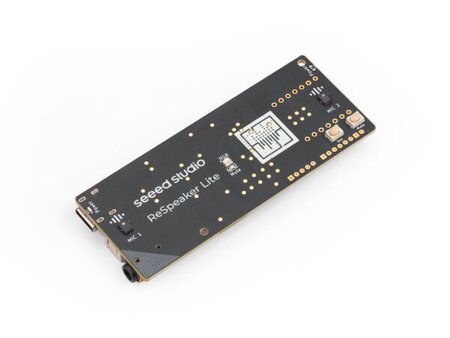
The portable, battery-powered counterpart to the smart speaker. Where a smart speaker is stationary and always listening from a shelf, a voice terminal is something you carry with you or pick up when you need it — a handheld device with a microphone, speaker, a button, and not much else.
The typical workflow: press the button, speak your question, and the device streams your audio over Wi-Fi to a local server. The server runs speech-to-text (Whisper), sends the transcribed text to a local LLM (like Ollama running Llama or Mistral), and streams the response back as synthesized speech (Piper). The device speaks the answer. The entire round trip stays on your network — no cloud API calls, no data leaving your house.
This is essentially a Star Trek communicator for your home server. Press, talk, get an intelligent answer, done.
This is an emerging category. If you followed the launches of the Humane AI Pin and Rabbit R1 in 2024 — both widely criticized for being overpriced, cloud-dependent, and subscription-locked (MKBHD called the AI Pin “the worst product I’ve ever reviewed”) — you’ve seen the concept done badly. The idea of a small, portable device you talk to and get intelligent answers from isn’t wrong. The execution was: closed firmware, mandatory cloud, $24/month subscriptions, and hardware you couldn’t repurpose when the company pivoted. The open-source ESP32 versions solve all of that by running against your own infrastructure.
The hardware is still maturing. There’s no single dominant “buy this open voice puck” product yet, but several projects and devices are converging on the form factor:
- Seeed ReSpeaker Lite — a 2-mic array voice kit, ESPHome compatible, designed to work with Home Assistant’s voice pipeline.
- Xiaozhi Xmini-C3 — a small open-source board for the Xiaozhi voice assistant framework.
- KALO ESP32 Voice Chat — fully open-source with published PCB and Gerber files.
- LILYGO T-Circle-S3 — a tiny circular device with a 0.75-inch touch display, microphone, and speaker.
- AIPI Lite — ships with cloud firmware, but the community has created ESPHome templates to reflash it for local use.
What people build:
- Portable AI voice interfaces (press-to-talk LLM interaction)
- Handheld intercoms
- LoRa voice communicators
- Wearable voice command devices
- Home automation voice remotes
Cyberdeck
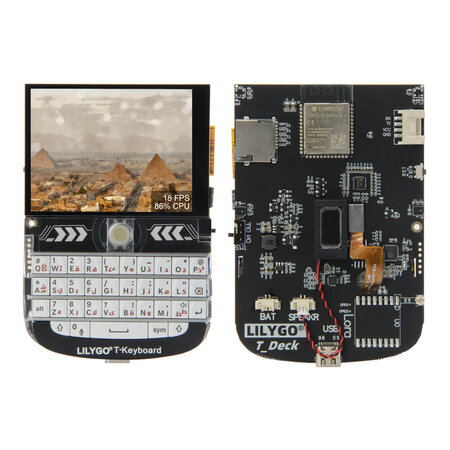
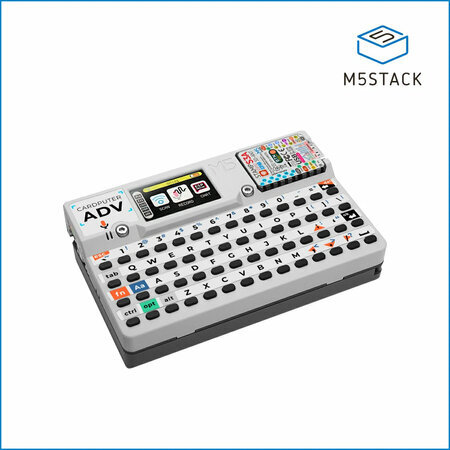
Small keyboard-equipped handheld computers — the closest thing to a pocket Linux terminal in microcontroller form. If you’re old enough to remember two-way pagers like the Motorola Talkabout T900 or the early BlackBerry devices from the early 2000s, these will feel familiar: a small screen, a tiny keyboard, wireless connectivity, and the ability to send and receive messages from your pocket. The difference is that a cyberdeck is fully programmable and not tied to a paging network or carrier.
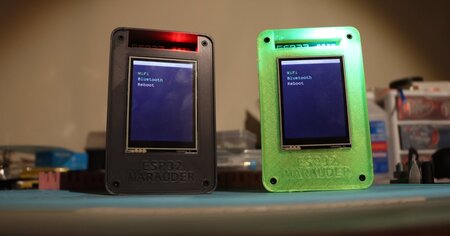
This form factor has also become the home of a thriving hacker tool scene, largely inspired by the Flipper Zero. Tindie — the indie hardware marketplace — is full of ESP32-based pentesting and security research devices that take the concept further: Wi-Fi and Bluetooth auditing tools, RFID readers, sub-GHz radio analyzers, and more, all packed into pocket-sized handhelds. Projects like ESP32 Marauder (a Wi-Fi/Bluetooth penetration testing suite), Bruce Cardputer (an M5Stack Cardputer pre-flashed with the BRUCE pentesting firmware), and CapibaraZero (an open-source firmware that turns off-the-shelf ESP32-S3 hardware into a Flipper Zero alternative with Wi-Fi, BLE, NFC, BadUSB, sub-GHz, and IR) show what happens when cheap open hardware meets a community of security researchers. Many of these devices cost $30–$60 — a fraction of the Flipper Zero’s $169 — and are fully open source.
Examples: LILYGO T-Deck, M5Stack Cardputer, Bruce T-Embed
What people build:
- Portable programming terminals
- SSH clients
- Network diagnostics consoles
- Wi-Fi/Bluetooth pentesting toolkits
- RFID and sub-GHz security research tools
- Hacking toolkits in the spirit of Flipper Zero
Handheld Console
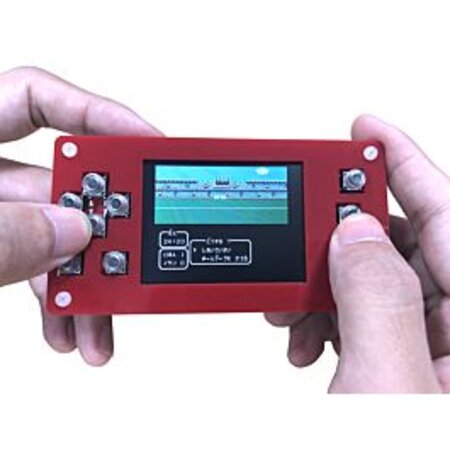
Retro-style gaming handhelds that typically look like a Game Boy — portrait orientation, d-pad, a couple of face buttons, and a small screen. Devices like the ESPlay Micro and various ODROID-GO derivatives fit this mold. Even the Retroflag GPi case — designed for a Raspberry Pi Zero — nails the Game Boy aesthetic so well it’s worth mentioning here, even though it’s not ESP32-based. If you want something wider and more ergonomic — a PSP or Steam Deck-style landscape layout with grip handles — that’s mostly DIY territory for now: 3D-printed enclosures and custom PCBs. No major ESP32 vendor sells one off the shelf in that form factor yet, but the community builds them.
Either way, the same form factor works for much more than games.
What people build:
- Retro gaming / emulator platforms (Game Boy, NES, Sega Master System)
- Wireless hacking toolkits and network scanners
- Educational programming toys
- Chiptune music tools
- RF experimentation platforms
The crossover between gaming console and hacking toolkit is strong here. A device with a screen, buttons, battery, and wireless radios is essentially a portable digital multitool — similar in spirit to a Flipper Zero, but built on open hardware.
Walkie-Talkie
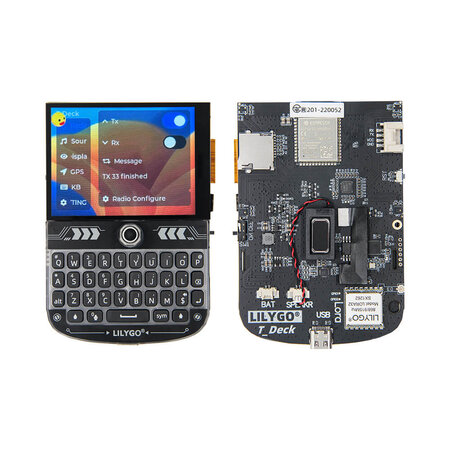
Portable radio-style devices with LoRa or mesh networking. Worth noting: most of these are text-based messengers, not voice radios. LoRa’s bandwidth is too low for real-time audio. They’re walkie-talkies in spirit — small, handheld, push-to-communicate devices — but the messages are text, GPS coordinates, or sensor data rather than speech. The form factor and the use case (field communication without infrastructure) are the same; the medium is different.
Some of these devices have their own screens and can operate standalone, but many — particularly Meshtastic nodes — are designed to pair with a smartphone running a dedicated app. The phone provides the typing and reading interface; the ESP32 device handles the radio. Think of it as a modem in your pocket.
Examples: Elecrow ThinkNode M2, ThinkNode M5, LILYGO T-Deck
Elecrow’s ThinkNode line is one of the most complete Meshtastic product families from a single vendor. The M2 ($21.90) is a pocket-sized ESP32-S3 node with a 1.3″ OLED display — one of the cheapest ways to get on a mesh network. The M5 adds a larger 1.54″ screen and GPS. They also make a solar-powered outdoor node (M6), a GPS tracker card (M3), and CrowPanel Advance displays pre-configured for Meshtastic with full touchscreen interfaces.
What people build:
- LoRa text messengers
- Meshtastic mesh network nodes
- Emergency communicators
- GPS position beacons
Remote Control
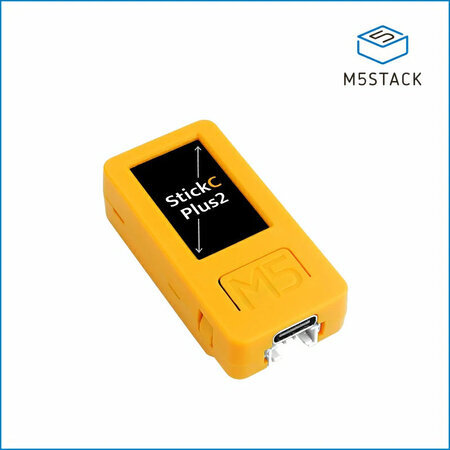
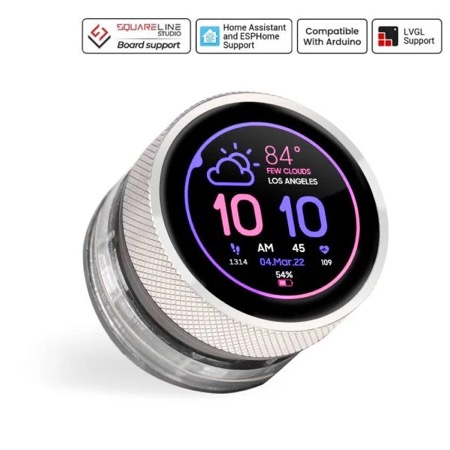
Small handheld devices with buttons, tiny screens, and wireless connectivity.
The M5StickC Plus2 is the Swiss Army knife of this category — a tiny ESP32-based stick with a 1.14″ LCD, two buttons, an IR transmitter, a 6-axis IMU, and a battery, all in a case the size of a lighter. It’s cheap (~$20), pocketable, and versatile enough that people use it as everything from a TV remote clone to a BLE beacon trigger to a portable sensor readout. M5Stack also sells snap-on sensor hats that extend it without soldering.
The CrowPanel Rotary Display takes a different approach — a 1.28″ round IPS touchscreen built into an aluminum knob with an ESP32-S3. It combines rotation (clockwise/counterclockwise), a press action, and capacitive touch on the screen itself. Think of a programmable Nest thermostat dial: turn it to adjust volume, temperature, or lighting levels; tap the screen to switch modes; press to confirm. At $29 with Wi-Fi, BLE, and LVGL support, it’s a physical controller that can talk to Home Assistant or any MQTT broker on your network.
Examples: M5StickC Plus2, Elecrow CrowPanel 1.28″ Rotary Display
What people build:
- Home automation remotes
- IR learning remotes
- Media controllers
- Smart home dial controllers (volume, lighting, thermostat)
- Device configuration tools
Security Camera
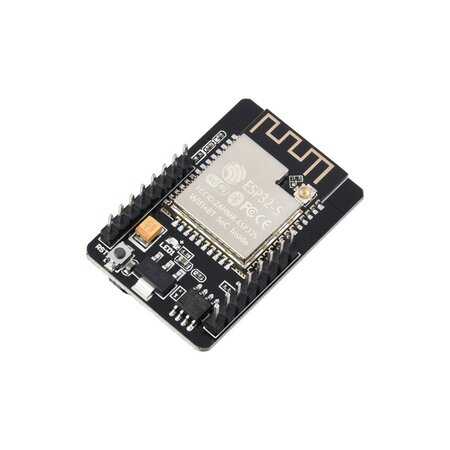
ESP32 devices with integrated camera modules. Out of the box, these don’t look like security cameras — they’re tiny bare circuit boards with a camera module soldered on. The ESP32-CAM is barely larger than a postage stamp. The ESP32-S3-EYE adds an LCD and microphone but is still an exposed dev board.
What turns them into security cameras (or dash cams, or wildlife cams) is the enclosure. There’s a thriving ecosystem of 3D-printable cases on Printables, Thingiverse, and MakerWorld — everything from wall-mount housings with ball joints to dummy security camera shells that the board drops into. The form factor is whatever you make it. The board just provides the camera, Wi-Fi streaming, and optional motion detection or face recognition.
Examples: ESP32-CAM, ESP32-S3-EYE
What people build:
- DIY surveillance cameras
- Dash cams
- Wildlife / trail cameras
- Machine vision sensors
- Robotics vision modules
- 3D printer monitors
Wall Panel / Smart Mirror
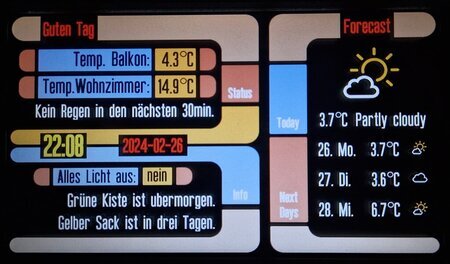
These are two variations on the same idea: a flat, wall-mounted touchscreen that displays information and controls your home. The difference is cosmetic.
A wall panel looks like what it is — a visible screen mounted to the wall, usually in a frame or flush-mount bracket. Think of a tablet permanently attached next to a light switch. It’s obviously a piece of technology.
A smart mirror hides the screen behind two-way glass. When the display is off, it looks like an ordinary mirror. When it’s on, information appears overlaid on your reflection — time, weather, calendar, notifications. Capacitive touch panels work through thin two-way glass, so it can be interactive without looking like a screen. No dedicated smart mirror dev kit exists yet, which makes this one of the few form factors still assembled entirely from generic parts.
Under the hood, both run the same software, use the same ESP32 boards, and serve the same purpose. One is visible technology; the other is technology disguised as furniture.
Examples: Elecrow CrowPanel Advance 5″, CrowPanel Advance 7″ ESP32-S3
Elecrow’s CrowPanel Advance line is well suited here — 5″ and 7″ IPS touchscreens with ESP32-S3, LVGL support, and enough resolution (800×480) for a usable home automation interface. Mount one next to a light switch running a Home Assistant dashboard and it replaces a commercial wall panel at a fraction of the cost.
What people build:
- Smart home wall controllers
- Alarm panels
- Building automation displays
- Room scheduling panels
- Weather and calendar displays
- Notification centers
Smart Clock
Small desktop devices with a display, Wi-Fi, and usually a speaker — essentially a bedside or desk companion. Think of the consumer smart clocks that have become popular in recent years: the Amazon Echo Spot, the Lenovo Smart Clock, or the Google Nest Hub used as a nightstand clock. The ESP32 version does the same job — shows the time, weather, sensor readings, notifications — but you control what it displays and where the data comes from.
These tend to be some of the simpler ESP32 builds, which makes them a good entry point for someone’s first Open ESP32 Gadget project. E-paper is a natural fit here — always-on, zero power draw when static, readable in daylight. Elecrow’s CrowPanel e-paper line ranges from 1.54″ to 5.79″, all ESP32-based, starting around $11. A 4.2″ e-paper display on a nightstand showing the time, weather, and your calendar is a compelling alternative to a glowing LCD.
What people build:
- Alarm clocks with custom displays
- Environmental monitors (temperature, humidity, air quality)
- Calendar and agenda displays
- Notification centers
- Pomodoro / productivity timers
IoT Cube
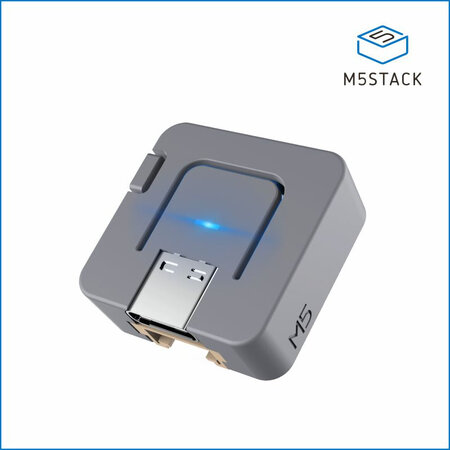
The smallest form factor in the taxonomy. The M5Stack Atom is just 24 x 24mm, roughly the size of a quarter, and designed to disappear into your environment. No screen to speak of (maybe a 5×5 RGB LED matrix or a single status LED), no keyboard, no pretense of being a handheld device. They’re nodes. You place them around your house, your workshop, your office, and they quietly do one thing well.
The M5Stack Atom series is the most developed product line here, with variants for different use cases: the Atom Lite (bare bones, just Wi-Fi and a button), the Atom Matrix (adds a 5×5 LED grid and IMU), the Atom Echo (adds a microphone and speaker for voice), and the Atom SPK (audio output). Each one plugs into M5Stack’s ecosystem of snap-on sensor bases — PIR motion, temperature/humidity, relay switches, GPS, NFC readers — so you can assemble a purpose-built node without soldering.
These are the devices that make the “home server as hub” architecture work at scale. A single Home Assistant instance might talk to a dozen Atom nodes scattered around the house — one monitoring temperature in the garage, one listening for a wake word in the kitchen, one acting as a doorbell, one triggering automations via NFC on your desk. An IoT cube with an NFC reader is a particularly elegant example: tap a card to trigger a light scene, start a playlist, run a script, or arm an alarm. The cube becomes a physical command interface — programmable buttons without the buttons. Each card is a different macro.
Examples: M5Stack Atom Lite, Atom Matrix, Atom Echo
What people build:
- NFC command terminals (each card triggers a different automation)
- Voice satellites for Home Assistant
- Motion / presence sensors
- Environmental monitors (temperature, humidity, air quality)
- Smart doorbells
- BLE beacons
- Automation trigger devices
- IR blasters for controlling legacy AV equipment
LED Ticker
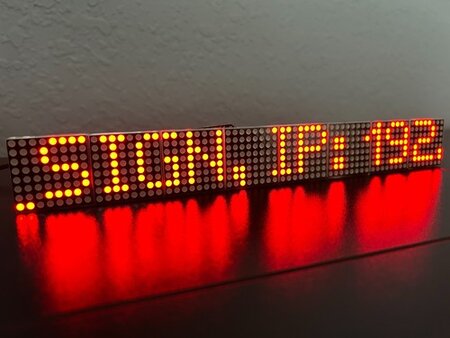
Scrolling LED message signs — the kind you see in shop windows, radio studios, and transit systems.
LED tickers are one of the few gadget types that smartphones never absorbed. Ambient signage still needs a dedicated device, and ESP32 hardware makes it programmable.
What people build:
- News/RSS tickers
- Radio station now-playing displays
- IoT event stream monitors
- Stock/sensor tickers
- Digital art installations
Why This Category Exists
Four things about ESP32 hardware created this ecosystem:
Built-in wireless. Every ESP32 includes Wi-Fi and Bluetooth. Newer variants add Thread, Zigbee, and 802.15.4. This makes every device network-capable by default.
Low cost. ESP32 chips cost $2–$6. This is cheap enough that manufacturers can build complete gadgets — with screens, batteries, and enclosures — and sell them as dev kits at accessible prices.
Strong display support. ESP32 chips have excellent support for SPI displays, parallel RGB panels, touch controllers, and UI frameworks like LVGL. This makes screen-based gadgets practical on microcontroller hardware.
Integrated peripherals and enclosures. This is the one that really changed things. Traditionally, adding a screen, microphone, speaker, or battery to a microcontroller project meant sourcing individual components, soldering them together, figuring out pin assignments, and designing or 3D-printing an enclosure. Each add-on was a friction point that could kill a project before it got interesting. Devices like the M5Stack Core, ESP32-S3-BOX, LILYGO T-Display, and Elecrow CrowPanel ship with all of that already done — screen attached, mic and speaker wired, battery management built in, enclosed in a case. You open the box, flash firmware, and you have a working gadget. The hardware integration that used to take days of soldering and troubleshooting now takes zero effort, which means more people actually finish their projects.
Other Platforms in the Open Gadget Space
ESP32 dominates the gadget-style form factors, but other platforms overlap with this category — and in some cases are better suited for specific builds.
Raspberry Pi / Pi Zero W is the most obvious neighbor. A Pi Zero W is a full Linux computer the size of a stick of gum, with Wi-Fi, Bluetooth, HDMI output, USB, and a camera connector — all for around $15. It runs a real operating system, which means it can do things an ESP32 can’t: serve web applications, run Docker containers, handle video encoding, or act as a full desktop. Smart mirrors are often built on Raspberry Pi rather than ESP32, because driving a large display with a browser-based UI is more natural on Linux. The Pi is also the backbone of many retro gaming handhelds (RetroPie), media players (Kodi), and home servers. The tradeoff is power consumption and boot time — a Pi needs more battery and takes seconds to start, while an ESP32 wakes instantly and sips power.
Arduino is where the maker movement started, and it still has a massive ecosystem of shields, sensors, and community projects. Newer boards like the Arduino Nano ESP32 (which is actually ESP32-based) and the Arduino MKR family add wireless connectivity. But most classic Arduino boards lack built-in Wi-Fi and have limited RAM and processing power, so they tend to appear in simpler projects — sensor nodes, motor controllers, basic displays — rather than screen-heavy gadgets. Arduino is more likely to be the brains inside a custom device than the platform for a finished-looking gadget.
Raspberry Pi Pico / RP2040 occupies a middle ground. The Pico W added Wi-Fi, making it more competitive with ESP32 for IoT projects. The RP2040 chip shows up in some gadget-style devices — the Pimoroni Badger 2040 (an e-ink conference badge) and the Pimoroni PicoSystem (a tiny gaming handheld) are good examples. But the ecosystem of ready-made gadget enclosures and form factors is much smaller than ESP32’s.
Nordic nRF52 is strong in wearables. The PineTime smartwatch runs on an nRF52832 and is one of the most polished open-source watch projects. Nordic chips excel at low-power Bluetooth applications but generally lack Wi-Fi and the display/audio support that ESP32 offers.
Teensy is a powerhouse for audio and real-time applications — synthesizers, MIDI controllers, audio processors — but it lacks built-in wireless and doesn’t have an ecosystem of gadget-shaped dev kits.
The open gadget idea isn’t exclusive to any one chip. But ESP32 has the widest selection of ready-to-use devices in recognizable consumer form factors, which is why it anchors this guide. Many of the best builds combine platforms — an ESP32 voice terminal talking to a Raspberry Pi running Home Assistant, or an Arduino sensor node feeding data to an ESP32 desk display.
Why Open ESP32 Gadgets Matter Now
You Control the Entire Stack
Modern consumer electronics are closed systems. Your smart speaker needs a cloud account. Your smartwatch sends data to a corporate server. Your home automation panel stops working when the company shuts down its service.
Open ESP32 Gadgets put the entire stack back under your control:
- The firmware is yours to write and modify
- The networking runs on your terms — local Wi-Fi, your own server, your VPN
- The data stays where you put it
- The device keeps working as long as the hardware does
No subscription. No third-party server. No planned obsolescence through software updates you didn’t ask for.
Local-First by Default
Many ESP32 gadgets are designed to work entirely offline or within a local network. A smart display can control your home automation through a local MQTT broker. A LoRa walkie-talkie communicates peer-to-peer with no infrastructure at all. A GPS navigator can pull map tiles from your own NAS over a VPN.
This local-first design is increasingly attractive as people deal with privacy concerns, cloud service shutdowns, and the realization that “smart” devices often stop being smart when a company changes direction.
The Home Server as the Hub
What ties all of these gadgets together is the server they talk to — and that server can be yours.
A growing number of people run home servers on a NAS, a Raspberry Pi, or an old PC. The software stack is open source and mature:
- Home Assistant is the center of gravity. It’s an open-source home automation platform that runs locally and integrates with hundreds of device types, including ESP32 hardware through ESPHome. Your smart clock, wall panel, voice terminal, and desk display can all report to and be controlled by a single Home Assistant instance running in your house. No cloud account required.
- Wyoming Protocol solves voice. It’s an open protocol that Home Assistant uses for speech-to-text and text-to-speech, allowing voice terminals and smart speakers to process speech entirely on your local network. Your ESP32 voice terminal sends audio to a Wyoming-compatible server (like Whisper for STT and Piper for TTS) running on your home hardware. The wake word, the transcription, and the response all stay on your network — nothing leaves your house.
- MQTT is the messaging layer. Lightweight enough for microcontrollers, it lets ESP32 devices publish sensor data and receive commands through a local broker like Mosquitto. Your IoT cubes, smart clocks, and sensor nodes can all communicate through MQTT without touching the internet.
- Self-hosted services fill in the rest. Map tiles served from OpenStreetMap data on your NAS. Media streamed from Jellyfin. DNS filtering through Pi-hole or AdGuard Home. Each ESP32 gadget becomes a client to infrastructure you own.
And none of this has to stay inside your house. VPN services like Tailscale or WireGuard let your gadgets reach your home server from anywhere — securely, without opening ports or relying on a third party’s cloud relay. Your ESP32 smartphone can pull Home Assistant dashboards over Tailscale while you’re on the road. Your LoRa GPS tracker can relay positions to your server through a gateway on your home network. Your cyberdeck can SSH into your machines from a coffee shop.
The result is a personal technology stack: open-source gadgets talking to an open-source server over an encrypted tunnel, with every layer controlled by you. It’s the opposite of the consumer electronics model, where each device phones home to a different company’s cloud.
The Vibecoding Era
Perhaps the most important shift: AI-assisted programming has dramatically lowered the barrier to building custom devices.
Someone who has never written embedded firmware can now describe what they want — a LoRa messenger, a sensor dashboard, a voice-controlled automation terminal — and use tools like Claude Code, OpenAI Codex, Google Gemini CLI, or GitHub Copilot to generate working code for an ESP32 platform.
This changes the equation completely. The hardware is cheap and available off the shelf. The software can be generated and iterated on conversationally. The result is that anyone with an idea can build a purpose-built device that does exactly what they need.
We’re moving from buying a device and adapting to its limitations to building a device that fits your specific use case.
Part of a Bigger Movement
Open ESP32 Gadgets don’t exist in a vacuum. They’re the latest expression of something people have been doing for decades: taking control of their own hardware.
PC building established the template. Starting in the 1990s, people rejected the idea that a computer had to come as a sealed box from Dell or Compaq. You picked your own motherboard, CPU, GPU, RAM, and case. You chose your own operating system. The machine was yours — not just something you bought, but something you understood and assembled. PC building proved that ordinary people would choose modularity and control over convenience, given the option.
The maker movement expanded that ethos beyond the desktop. Arduino put microcontrollers in the hands of artists, designers, and hobbyists who had never written embedded code. 3D printers made custom enclosures possible. Raspberry Pi turned a $35 board into a home server, media center, or retro gaming console. Hackerspaces and Maker Faires built communities around the idea that building your own technology wasn’t just for engineers — it was for anyone willing to learn.
Open ESP32 Gadgets are where these threads converge. The maker movement gave people the skills and confidence to build hardware. PC building culture normalized the idea of assembling your own devices from components. And now ESP32 hardware provides something neither movement had before: cheap, wireless, display-equipped platforms that look and feel like finished consumer devices while remaining completely open.
The difference is that you’re no longer building a computer that sits on a desk or a one-off Arduino project wired together on a breadboard. You’re building a watch. A phone. A walkie-talkie. A smart speaker. Devices that go in your pocket, hang on your wall, or sit on your nightstand — devices that replace the closed consumer electronics you used to have no alternative to.
A Historical Echo
In the late 1990s and early 2000s, people carried a collection of specialized electronic devices:
- PalmPilot (PDA)
- iPod (music player)
- Garmin (GPS navigator)
- Game Boy (handheld console)
- Motorola FRS radio (walkie-talkie)
- Sony Cyber-shot (digital camera)
- BlackBerry (communicator)
The smartphone absorbed nearly all of them into a single device.
Now a similar diversification is happening again. The ESP32 ecosystem is re-creating many of those specialized device forms — watches, phones, consoles, communicators, cameras, displays — but with a fundamental difference:
Instead of buying closed devices from manufacturers, people build personalized open gadgets that do exactly what they want.
It’s a return to the spirit of early personal computing, when the whole point was that you could make the machine do whatever you imagined. The difference today is that the hardware costs a few dollars, and an AI can help you write the code.
The Full Taxonomy
| Form Factor | Example Devices | Key Applications |
|---|---|---|
| Smartwatch | T-Watch S3 | Fitness tracker, sensor dashboard, notifications |
| Smartphone | LILYGO T-Display P4 | Music player, LoRa communicator, portable terminal |
| Tablet | CrowPanel 7″, CrowPanel Advance 10.1″ ESP32-P4 | DIY GPS, industrial dashboard, automation controller |
| Desk Smart Display | ESP32-S3-BOX-3, M5Stack CoreS3 | Smart home dashboard, weather station, voice assistant |
| Smart Speaker | ESP32-S3-BOX-3, Atom Echo | Offline voice assistant, intercom, voice satellite |
| Voice Terminal | ReSpeaker Lite | Portable AI voice interface, handheld intercom |
| Cyberdeck | LILYGO T-Deck, M5Stack Cardputer | SSH terminal, network diagnostics, hacking toolkit |
| Handheld Console | ESPlay Micro V2 | Retro gaming, hacking toolkit, RF experimentation |
| Walkie-Talkie | ThinkNode M2, T-Deck Meshtastic | Meshtastic, mesh messaging, emergency comms |
| Remote Control | M5StickC Plus2, CrowPanel 1.28″ Rotary | Home automation, IR remote, media controller, smart dial |
| Security Camera | ESP32-CAM | Surveillance, wildlife cam, machine vision |
| Wall Panel / Smart Mirror | CrowPanel Advance 5″, CrowPanel Advance 7″ | Home automation, alarm panel, calendar, notifications |
| Smart Clock | CrowPanel 1.28″ Round, CrowPanel E-Paper series | Alarm clock, environmental monitor, notification center |
| IoT Cube | M5Stack Atom, Atom Echo | NFC command terminal, voice satellite, sensor node |
| LED Ticker | ESP32 + LED matrix | News ticker, now-playing sign, IoT event display |
Open ESP32 Gadgets are not consumer electronics and not traditional dev boards. They’re something in between — programmable devices in familiar shapes, built on open hardware, running open software, controlled entirely by the person who owns them. In an era of cloud-dependent, subscription-driven, closed-source consumer gadgets, that’s a category worth naming.